Every call, in your toolbar.
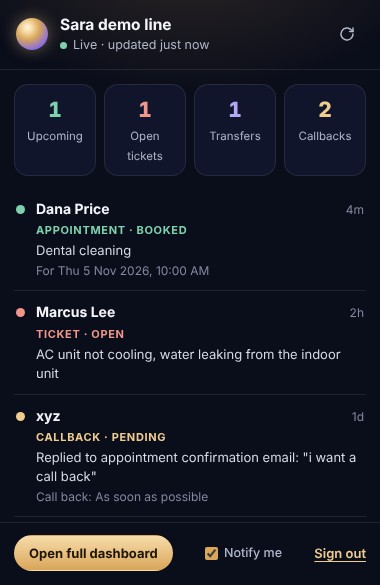
See each appointment, ticket, transfer and callback the moment Sara handles it. A badge counts new calls, and a desktop notification tells you who called and why.
Works in Chrome, Edge, Brave and other Chromium browsers. Version 1.0.0, 36 KB.
Install in under a minute
Sara isn't on the Chrome Web Store yet, so you add it yourself. It's four quick steps.
- Download and unzip
Click Download for Chrome, then unzip
sara-extension.zipinto a folder you'll keep, such as Documents. - Open your extensions
Go to
chrome://extensionsin the address bar and switch on Developer mode in the top-right corner. - Load Sara
Click Load unpacked and choose the folder you unzipped. Sara appears in your extensions list.
- Pin and sign in
Click the puzzle icon in the toolbar, pin Sara, open it, and sign in with your business email. You'll get a 6-digit code.
Only your business's calls, and only after you sign in with a code sent to your email.
New calls show as a badge on the icon, with an optional desktop notification.
Open the web dashboard to search, filter and see your full history.